
Meitu
Screenshots
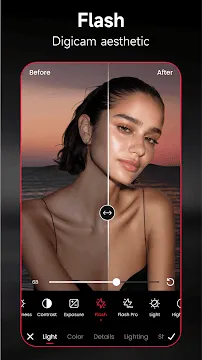
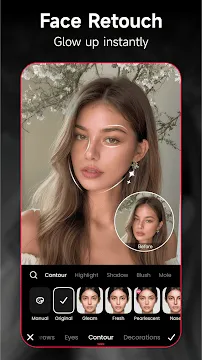
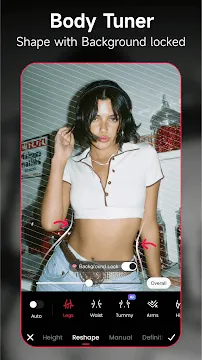
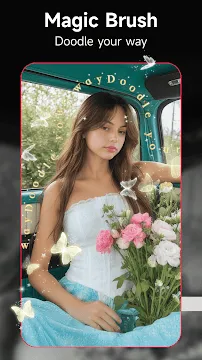
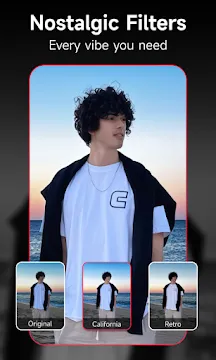
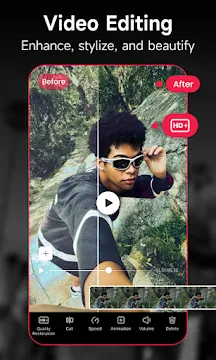
Meitu- AI Photo & Video Editor For Android provides a comprehensive set of digital tools for enhancing your visual content. Millions of users around the world use this application to transform their daily selfies and videos into professional-looking media. The software combines traditional editing features with modern artificial intelligence to simplify complex tasks like background removal and facial retouching. You can access hundreds of filters, stickers, and frames to add a personal touch to every project.
The application serves a wide audience, including social media influencers, casual photographers, and digital artists. It features an intuitive interface that allows you to start editing as soon as you open the app. You can smooth your skin, brighten your eyes, or even adjust your body shape with just a few taps on the screen. Additionally, the integrated video editor helps you create engaging short-form content for platforms like TikTok or Instagram. The software focuses on speed and efficiency to help you achieve high-quality results without a steep learning curve.
Advanced AI Portraits and Instant Beautification
One of the most popular features of Meitu is its ability to refine portraits using intelligent detection. The software automatically identifies facial features to apply makeup, smooth skin textures, and remove unwanted blemishes. You can choose from various beautification levels to achieve a look that feels natural or highly polished. This automation saves time and ensures that your photos look consistent across your entire gallery.
Furthermore, the AI can turn your standard portraits into unique artistic illustrations. You can apply different art styles, such as oil paintings or hand-drawn sketches, to create one-of-a-kind profile pictures. The app also includes a “smart reshape” tool that allows you to adjust facial proportions or body height while keeping the background intact. These features provide you with professional-level retouching tools right on your mobile device.
Powerful Video Editing and Retouching
Beyond static images, Meitu includes a robust video editor designed for modern content creators. You can easily trim clips, add transitions, and overlay music to create a complete story. The editor supports high-resolution exports to ensure your videos look crisp on any screen. You can also apply the same beauty filters used in photos to your video clips in real-time.
- Add stylish fonts and animated subtitles to your projects.
- Apply cinematic filters to change the mood of your videos.
- Use the auto-cut feature to sync your clips with music beats.
- Retouch facial features in video segments for a flawless look.
These tools make it simple to produce professional vlogs or promotional clips without needing a computer. The background blur feature helps you isolate subjects and create a professional depth-of-field effect. This versatility ensures that your video content stands out in a crowded digital landscape.
Creative Filters and Artistic Effects
Meitu hosts a massive collection of over 200 original filters that can transform any dull photo. You can explore various categories like vintage, aesthetic, and vibrant to find the perfect match for your image. Many filters utilize AI to adjust lighting and color balance automatically based on the content of the photo. This ensures that your landscapes, food shots, and cityscapes always look their best.
In addition to standard filters, you can use the “Magic Brush” to doodle over your images with sparkling effects or artistic patterns. The mosaic tool allows you to hide specific parts of a photo with creative designs instead of simple blurring. These artistic elements encourage you to experiment and find your own unique style. You can also layer multiple effects to create complex and visually stunning compositions.
Effortless Object Removal and Background Editing
Removing distracting elements from a perfect shot is easy with the built-in AI remover. You simply swipe over a person or object you want to disappear, and Meitu fills in the gap seamlessly. This feature is perfect for cleaning up crowded tourist spots or removing power lines from a beautiful landscape. The intelligent algorithm analyzes the surrounding pixels to ensure the edit looks completely natural.
- Erase unwanted bystanders from your vacation photos.
- Remove logos, watermarks, or text from images instantly.
- Replace boring backgrounds with stunning digital scenery.
- Batch edit multiple photos to remove consistent distractions.
This level of control helps you focus on the main subject of your photo without any interruptions. You can also use the cutout tool to extract objects and place them in new environments or collages. It provides a flexible way to repurpose your images for different creative projects.
Interactive Stickers and Custom Add-ons
To make your photos more engaging, Meitu provides thousands of stickers and frames that update regularly. You can find everything from cute motion stickers that track your face to professional borders that frame your work. These add-ons allow you to express your personality and make your media more relatable to your audience. You can also add custom text using a variety of stylish fonts and colors to convey your message clearly.
Meitu also features a collage maker that lets you combine up to 16 photos into a single layout. You can choose from many pre-designed templates or create your own custom arrangement. This is an excellent way to summarize an event or showcase a collection of related images. The drag-and-drop interface makes it fast and fun to organize your digital memories.
High-Quality Image Enhancement and Restoration
If you have old or blurry photos, Meitu includes a specialized AI enhancer to restore their quality. The algorithm sharpens details and reduces noise to make low-resolution images look clear and modern. This is particularly useful for improving photos taken in low-light conditions or with older cameras. You can give new life to your old memories with just a single click.
The batch editing feature further improves your efficiency by allowing you to apply the same edits to hundreds of photos at once. You can crop, resize, and filter a whole album in a fraction of the time it would take to do them individually. This makes the app a professional-grade tool for managing large sets of data. You get a stable and powerful platform that respects your time and your creative vision.
Final Thoughts
Meitu- AI Photo & Video Editor For Android is an all-in-one creative tool that bridges the gap between casual editing and professional design. It provides a vast array of AI-powered features that simplify the process of beautifying photos and videos. Whether you are removing an unwanted object, applying a vintage filter, or retouching a portrait, the app delivers high-quality results instantly. Its user-friendly interface and extensive library of materials make it accessible to everyone, regardless of their skill level. By offering seamless synchronization and batch editing, it also meets the needs of busy creators who require efficient workflows. This application remains a top choice for anyone looking to elevate their digital presence and share stunning visual stories with the world.